
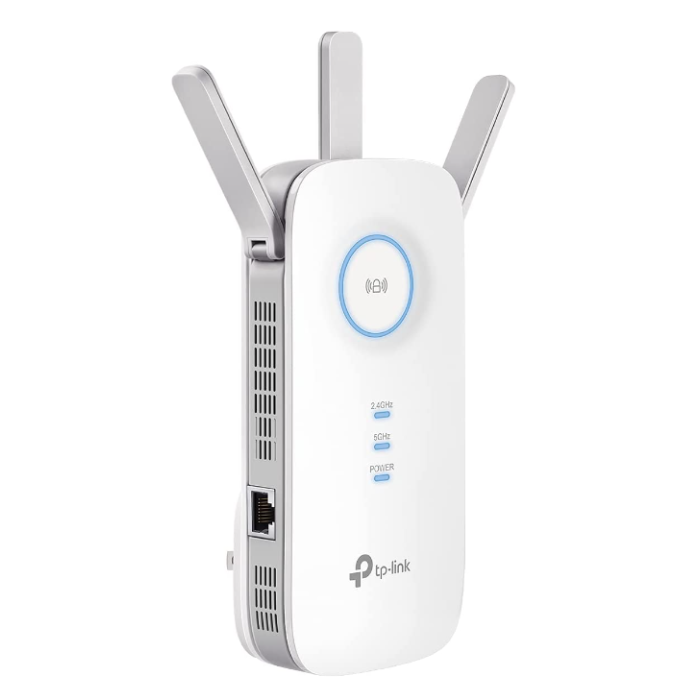
(RE550-WIFI-EXTENDER) Wifi Plug-in Secure Signal Extender
SKU
RE550-WIFI-EXTENDER
$149.00
Quick Overview

Item: RE550
Wifi Extender
This unit is perfect for devices that are difficult to hardwire to a network. Just plug the device into a power outlet and connect a PoE, NVR or IP Camera (with a PoE unit) and the device becomes a wifi wireless unit connected to your existing wifi network.
Up to 2800 Sq.ft and 35 Devices, 1900Mbps Dual Band Wireless Repeater, Internet Booster, Gigabit Ethernet Port

Item: RE550
This Wifi Extender expands wifi networks and turns any PoE, NVR or IP Camera (with a PoE Unit) into a wireless network camera.
- - Fast AC1900 Dual Band WiFi - Simultaneous 600Mbps on 2.4GHz plus 1300Mbps on 5GHz
- - Better WiFi Coverage with 3 Antennas - Three adjustable external antennas provide optimal Wi-Fi coverage
- - Gigabit Ethernet port - Act as a wireless adapter to connect a wired device to your network at Gigabit speed
- - Intelligent Signal Light - Help to find the best location for optimal Wi-Fi coverage by showing the signal strength
- - AP Mode - Create a new WiFi access point to enhance your wired network with WiFi capability
- - Ultimate Compatibility - Extend the range of any WiFi Internet router or wireless access point
- - TP-Link Tether App - Easily access and manage your network using any iOS or Android mobile device
- - All Wi-Fi extenders are designed to increase or improve Wi-Fi coverage

Chapters

1 - The Smart Way to Shop for Security Cameras
Many consumers are more confused at the end of shopping for a security solution than when they started. (video)2 - Choosing the Right Technology
There are so many different technologies on the market: solar, battery, wireless, wired and then there's Consumer Grade and Professional Grade versions of these products. How do you know which is right for you? (video)3 - Industry Warranty's Indicate Quality
A security camera's warranty is a good indication of its quality and how long you should expect it to last. Warranties range from 1 to 10 years. Know the warranty before you buy! (video)
4 - The Pro's Golden Rules
There are golden rules that should be considered when purchasing any security camera system. We explain each rule so you "Get It Right the First Time"! (video)5 - Understanding Resolution & Frame Rates
Let's cut through the confusion and keep things simple when it comes to video clarity and resolution. Which resolution is right for your application? (video)6 - Camera System Components
Learn the basic parts that are used in all video security camera systems: camera components, cable, recorders, monitors & internet connection. This video covers it all. (video)
7 - Best Camera Locations & Heights
Learn recommended camera fields of view, installation locations and heights for best coverage. Your design should be flexible while following these best practices.8 - Selecting the Right Camera & Mount
One size does NOT fit all! Learn how to select the right camera for each location. Optical Zoom vs Digital Zoom, how to capture license plates, color night vision & more. Follow the Pro's tips and get it right the first time. (video)9 - Video Recorders & Best Locations
How to select the right security NVR (network video recorder) for your application. Learn the best locations for video surveillance recorders.10 - Video Storage, Hard Drives & Cloud
Use our storage calculator to find out how big of a hard drive you need. Learn how to expand storage, protect against theft and what cloud options we offer. (video)
11 - PoE Units & How to Use Them
PoE units make installation more cost effective and provide flexible system design options. Learn what they are and how to use them.12 - Wire & Cable - Alternative Transmission Options
Learn how to wire a system, plan cable runs and design efficiently. If the camera installation is difficult, our wireless transmission options will solve the problem. (video)13 - Business System Design
Learn how to design an effective business security camera system. Effectively secure your assets and employees while managing your business operations from anywhere. (video)
14 - Home System Design
Learn how to design an effective home security camera system to secure your home, assets and family. Monitor your home remotely from anywhere. (video)15 - Interior Camera Placement
Learn how to effectively locate security cameras inside of your home or business for the best coverage while maintaining privacy.16 - DIY Installation or Pro Install - You Choose!
Most of our customers install the system themselves with our expert factory support, but you may want that clean professional installation completed by a pro. We support both options nationwide and you choose which you prefer. (video)
17 - Live & Remote Viewing with Alerts
You choose how you interface with our state-of-the-art-systems. All options are available and any combination of viewing options can be used: direct connect monitors, personal computers, tablets and smart phones - Super fast, clear and no monthly fees.18 - Customizing Kits - Sending Quotes - Financing
Learn how to customize any of our kits to meet your exact needs, then send a line-item PDF quote to any email you choose. Use our instant financing option during checkout to fit the budget. (video)19 - ProVue vs. Cyber Secure - Feature Comparison
We offer two high performance series. Both are cutting edge 4K solutions. Which series is right for you?20 - Become Certified Design Consultant
Help secure your community and earn a great income on your schedule. Backstreet University offers a professional consultant's training course.Design Tools & Resources

Expert System Design Service
Let one of our experts design your system. Its the sure way to get it right the first time at the lowest price. Book a 30 minute design appointment using our online calendar. You'll be glad you did!Do-it-yourself System Designer
Design your home or business security system like a Pro. Locate cameras and their viewing areas to provide a visual of the effective coverage of each camera and evaluate the overall design. This surveillance system design tool covers it all.
Custom Kit Builder
Build a complete custom system for your home or business without any confusion or mistakes. This easy to use tool makes sure you select all the components you need for a complete system. You can even include installation!Hard Drive Calculator
Use our video storage calculator to determine the size of the hard drive you need based on the number of cameras and the desired storage days.Security Industry Terms
Not sure what Cat6 is? Would you like to know the difference between a DVR and an NVR? Here are simple and clear explanations of the industry terms.Industry News & Events
Banned Security Brands
US government banned the use of Dahua, Lorex, Hikvision and other security cameras in federal facilities due to hidden backdoors. In June 2021, the FCC unanimously voted to start procedures to ban the sale of these brands to the general public by denying new products FCC approval.What is NDAA & Why It Matters
The NDAA law banned the use of electronic equipment provided by specific companies. What’s interesting about the law is that it bans companies rather than countries. It ignores borders and focuses on individual entities.Fun & Interesting How-to Videos
Subscribe to our Youtube channel and
learn how the experts get it right the first time!
26,000 Subscribers - 10,000,000 Views - 127,000 Hours of Watch Time